

Introduction
In today’s digital world, protecting your online accounts is more important than ever. From email to banking, social media, and shopping accounts, every login is a potential target for hackers. Knowing how to create strong passwords and keep accounts secure is no longer optional
it’s a necessity. Weak passwords, reused passwords, or predictable patterns can leave your sensitive data exposed, leading to identity theft, financial loss, and privacy breaches.
Many people assume a simple password like “123456” or “password” is enough. Unfortunately, cybercriminals can crack these in seconds. Strong passwords combined with good account security practices can make a huge difference. It’s not just about creating a complex password; it’s about adopting habits that reduce risks across all your online accounts.
In this guide, you will learn practical, easy-to-follow steps on how to create strong passwords and keep accounts secure. We will cover everything from understanding what a strong password is, why it matters, step-by-step techniques for creating them, common mistakes to avoid, and expert tips to stay safe online. By the end of this article, you’ll have the tools and confidence to protect your accounts effectively and reduce the risk of cyber attacks.
What is How to Create Strong Passwords and Keep Accounts Secure?
Creating strong passwords and keeping accounts secure is the practice of designing unique, difficult-to-guess passwords and combining them with strategies that protect your online identity. A strong password is typically:
- Long (at least 12–16 characters)
- Includes a mix of uppercase letters, lowercase letters, numbers, and special symbols
- Does not include obvious personal information like birthdays or names
Keeping accounts secure goes beyond passwords. It also involves:
- Using two-factor authentication (2FA)
- Monitoring account activity
- Avoiding password reuse
- Storing passwords safely in secure tools
This combination reduces the risk of hacking, phishing, or unauthorized access. Essentially, it’s about building layers of security that make it extremely hard for attackers to gain entry.
Why is How to Create Strong Passwords and Keep Accounts Secure Important?
The importance of strong passwords and account security cannot be overstated:
- Prevent Identity Theft – Weak passwords can lead to hackers stealing your personal information, which can be used for fraud.
- Protect Financial Information – Online banking, e-wallets, and payment apps are prime targets for cybercriminals. A strong password is your first line of defense.
- Safeguard Personal Data – Photos, emails, and private messages can be compromised if your account security is weak.
- Maintain Professional Reputation – Business accounts can be hacked, leading to loss of trust and credibility.
- Avoid Unwanted Access – Social media accounts with weak security can be misused, spreading misinformation or spam.
Strong passwords and account security practices provide peace of mind. You don’t have to live in fear of hacks when you implement these strategies.
Detailed Step-by-Step Guide
Step 1: Create a Strong Password
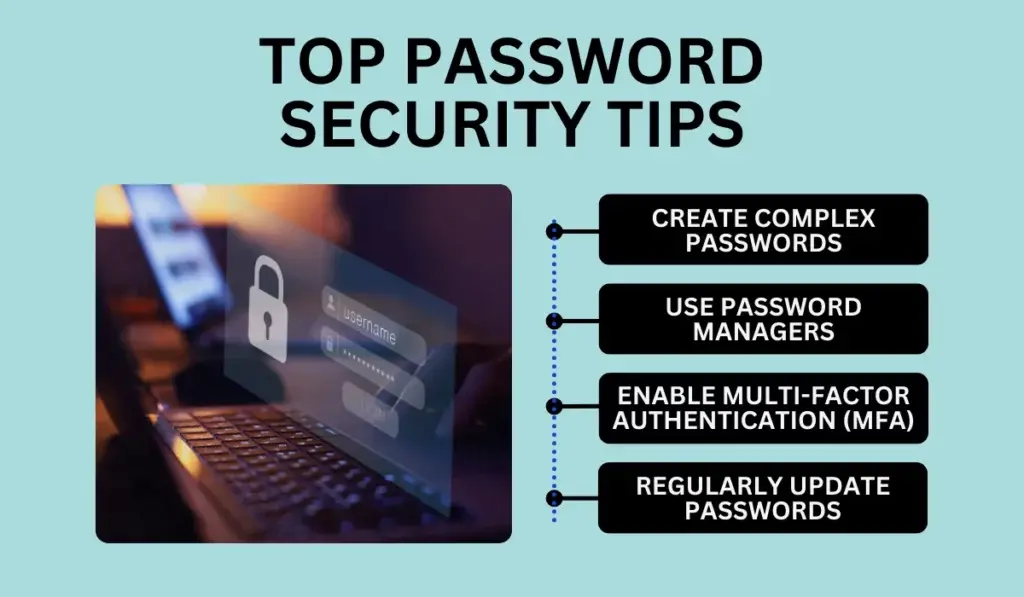
When learning how to create strong passwords and keep accounts secure, the password itself is the first step.
- Use a combination of uppercase and lowercase letters
- Include numbers and symbols (!, @, #, $, etc.)
- Avoid common words, patterns, or sequences like “12345” or “qwerty”
- Make it at least 12–16 characters long
Example of a strong password: D3f!n3R@1nB0w2026
Step 2: Avoid Password Reuse
Many people use the same password across multiple accounts. If one account is compromised, all accounts using the same password are at risk. Always use unique passwords for different platforms.
Step 3: Use a Password Manager
Password managers securely store and generate complex passwords, so you don’t have to memorize them all. They help you:
- Automatically fill in passwords
- Generate strong, unique passwords
- Update passwords regularly
Popular password manager features include encrypted storage and cross-device syncing.
Step 4: Enable Two-Factor Authentication (2FA)
2FA adds an extra layer of security by requiring a second verification step, usually via:
- SMS code
- Authenticator app
- Email confirmation
- Biometric verification (fingerprint or facial recognition)
Even if your password is stolen, 2FA prevents unauthorized access.
Step 5: Regularly Update Passwords
Updating passwords every 3–6 months reduces the risk of long-term breaches. Avoid predictable updates like “Password2023” → “Password2024.” Instead, create new complex passwords.
Step 6: Monitor Account Activity
Many platforms provide login history and alerts for suspicious activity. Regularly check these notifications to spot potential breaches early.
Step 7: Secure Your Devices
Passwords alone are not enough if your devices are compromised. Protect them by:
- Using device passwords or PINs
- Installing antivirus software
- Updating software and apps regularly
Step 8: Avoid Phishing and Social Engineering
Never click suspicious links or share passwords online. Hackers often trick users into revealing credentials. Be cautious with emails, messages, and calls asking for sensitive information.
Benefits of How to Create Strong Passwords and Keep Accounts Secure
- Reduces Risk of Hacking – Strong passwords make it harder for hackers to access accounts.
- Protects Personal and Financial Information – Sensitive data stays safe.
- Peace of Mind – You can use accounts confidently without fear of breaches.
- Avoids Identity Theft – Minimizes chances of personal identity misuse.
- Supports Online Privacy – Maintains confidentiality of messages and personal files.
Disadvantages / Risks
- Time-Consuming – Creating and remembering unique passwords for multiple accounts can be challenging.
- Dependence on Password Managers – Relying on tools can be risky if the manager is compromised.
- Frequent Updates Needed – Regularly changing passwords is necessary but may feel inconvenient.
- Complexity Can Cause Forgetfulness – Strong passwords are harder to memorize.
Common Mistakes to Avoid
- Using simple or obvious passwords
- Reusing passwords across multiple accounts
- Writing passwords on paper or storing them insecurely
- Ignoring 2FA and other security measures
- Falling for phishing attempts
- Using personal information like names, birthdays, or favorite sports teams in passwords
FAQs
1. How long should a strong password be?
A strong password should be at least 12–16 characters. Longer passwords are more secure. Include a mix of letters, numbers, and symbols.
2. Can I use a phrase instead of a complex password?
Yes. Using a passphrase made of random words (e.g., BlueTiger!Rain99) is effective and easier to remember than random characters.
3. Are password managers safe to use?
Yes. Reputable password managers encrypt your data, generate strong passwords, and reduce the risk of password reuse. Always choose trusted providers.
4. What is two-factor authentication (2FA)?
2FA is an additional security step after entering your password. It may require a code via SMS, email, or an authenticator app. It provides extra protection against unauthorized access.
5. How often should I change my passwords?
It’s recommended to update passwords every 3–6 months. If you suspect a breach, change it immediately.
6. Can I use the same password for multiple accounts if it’s strong?
No. Even strong passwords should be unique for each account. Reusing passwords increases the risk of multiple account compromises if one account is hacked.
7. How do I remember strong passwords?
Use password managers or create memorable passphrases combining unrelated words, numbers, and symbols.
8. What should I do if I suspect my account is hacked?
Immediately change your password, enable 2FA, review account activity, and notify the service provider if needed.
Expert Tips & Bonus Points
- Use Biometric Authentication – Fingerprint or facial recognition adds another security layer.
- Enable Security Alerts – Many platforms notify you of suspicious logins.
- Avoid Public Wi-Fi for Sensitive Logins – Public networks can be insecure. Use a VPN if necessary.
- Back Up Important Data – Protect against ransomware or account lockouts.
- Review Permissions – Limit third-party apps’ access to accounts.
- Create a Password Recovery Plan – Set secure recovery emails and questions.
Conclusion
Learning how to create strong passwords and keep accounts secure is essential in our digital era. Weak passwords and careless habits are the most common reasons for account breaches. By following the strategies outlined above, including creating unique strong passwords, using 2FA, monitoring accounts, and avoiding common mistakes, you can dramatically reduce your risk of cyber attacks.
Remember, online security is a habit, not a one-time task. Make password strength and account safety a priority, update your credentials regularly, and use reliable tools like password managers. Protecting your personal and financial information ensures peace of mind and allows you to navigate the online world safely. The steps are simple, but their impact on your digital safety is huge. Stay vigilant, stay secure, and take control of your online presence today.
